
Description
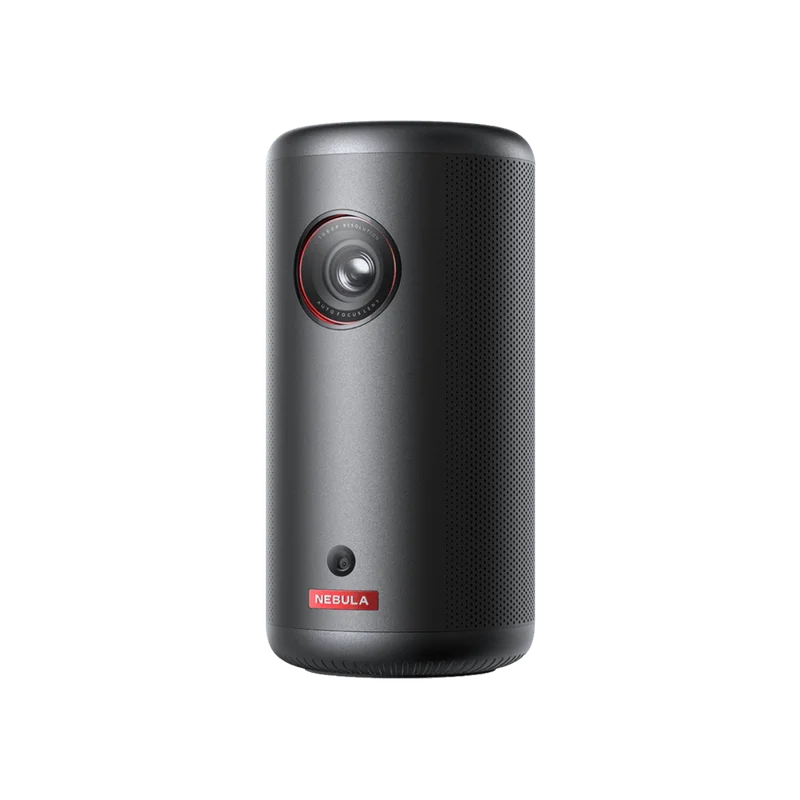
All-New Portable Google TV Projector Licensed by Netflix
Features
-
Ultra-Portable Cinema Experience: Transform any space into a movie theater with this outdoor projector’s 120-inch max screen size, offering an unparalleled portable viewing experience in a pocket-size design that is 50% smaller than comparable models.
-
Google TV Integration: Dive into a universe of entertainment with this smart projector, offering licensed Netflix streaming and a variety of content at your fingertips.
-
Hassle-Free, Smart Setup: Experience effortless setup with the Nebula Capsule 3’s Intelligent Environment Adaptation Technology, ensuring perfect projection in just 3 seconds, without manual adjustments.
-
High-Definition Visuals: Relish in the clarity of a 1080p display with 200 ANSI Lumens brightness, for a viewing experience that’s notably more vivid with the Nebula Capsule 3.
-
Extended Entertainment on a Single Charge: Enjoy up to 2.5 hours of movies or 10 hours of music on a single charge with the Nebula Capsule 3, ensuring your entertainment lasts longer.
Specifications
| Model Number | D2425 |
|---|---|
| Size | 78*78*160mm |
| Color | Black |
| Weight | 0.85kg |
| Display | Display Technology: DLP 0.23″ DMD Resolution: 1920=1080 Brightness:200 Ansi Lumens Lightsource Life: 30,000 hrs Aspect Ratio: 16:9 Throw Ratio 121 offset 100% Focus Adjustment: Auto Projection Mode front/rear/Front Ceiling/Rear Ceiling Keystone Correction auto Vertical, +-40 degree), Auto (horizontal +-40 degree) Interface: HDMI / USB-C / USB-A AUX |
| Software | OS: Google TV Working Modes: Projector Mode, Bluetooth Speaker Mode OTA: Supported App Store Supported Google Play Movie Playtime:2.6 hours in battery Mode Music Playtime 8 hrs in Bluetooth Speaker mode Charging time: 3 hrs with 20V/2.25A Type-C in |
| Hardware | CPU: Quad-Core ARM Cortex-A53 CPU GPU G52MCI RAM 2GB DDR ROM: 16 GB eMMC Battery 52wh Speaker: BW Wi Fl 802.11a/b/g/n/ac Dual Frequency 2.4/5GHz Bluetooth: 5.1 Fan: Under 28dB |
| Control | Physical Buttons: Power/Volume/D-Pad/Back/Mode Switch IR Remete: D-Pad Mode BT Remote App: Android and ioS |
Package Includes
-
Capsule 3
-
Adapter
-
Power Cable
-
QSG
-
2xAAA Batteries
-
Remote Control
What Our Experts Think
- Crisp 1080p Resolution: The Nebula Capsule 3 delivers sharp, high-definition 1080p resolution, providing an immersive viewing experience for movies, TV shows, and presentations.
- Compact & Portable: Its mini size makes it highly portable, allowing users to enjoy a big-screen experience anywhere, whether at home, outdoors, or on the go.
- Long Battery Life: Equipped with an impressive battery life, it offers up to 3 hours of continuous play, perfect for extended viewing sessions without the need for constant recharging.
- Built-In Speakers: Integrated with high-quality speakers for clear, rich sound, enhancing the audio experience without needing external speakers.
- Wireless Connectivity: Supports wireless streaming, allowing easy connection to devices such as smartphones, laptops, or gaming consoles for effortless media playback.
Q&A
Q: What is included in the Nebula Capsule 3 (New) Mini 1080p Projector package?
A: The package includes the Nebula Capsule 3 Mini 1080p Projector (Model D2425111), a portable and compact projector designed for on-the-go entertainment with a built-in speaker, and all necessary cables and accessories for setup.
Q: What are the key features of the Nebula Capsule 3 Mini 1080p Projector?
A:
- Full 1080p HD Resolution: Offers stunning clarity with 1080p resolution for vibrant, high-definition visuals.
- Portable Design: Compact and lightweight, the Capsule 3 can be easily transported for movies, presentations, or gaming anywhere.
- Built-in Speaker: Equipped with a powerful speaker for clear sound without needing external audio devices.
- Android 10.0 Operating System: Runs on Android 10.0, providing access to streaming apps, apps from the Google Play Store, and more.
- Battery Life: Up to 2.5 hours of continuous projection on a full charge, ideal for movie nights or short presentations.
- Wireless Streaming: Built-in Wi-Fi and Bluetooth for wireless streaming from smartphones, tablets, or laptops, and easy connection to external speakers or headphones.
- Auto Focus & Keystone Correction: Automatic focus adjustment and keystone correction ensure a sharp, clear image, even at different angles.
- Projection Size: Supports projection sizes up to 100 inches, providing an immersive viewing experience.
Q: What are the dimensions and weight of the Nebula Capsule 3?
A: The Nebula Capsule 3 has compact dimensions of approximately 3.1 x 3.1 x 5.9 inches and weighs about 1.6 lbs, making it easy to carry and set up anywhere.
Q: Why choose the Nebula Capsule 3 Mini 1080p Projector?
A: The Nebula Capsule 3 is a versatile, portable projector that delivers crisp 1080p visuals, a long-lasting battery, and built-in Android OS for seamless streaming, making it perfect for both entertainment and professional use.
Q: Can the Nebula Capsule 3 project in different lighting conditions?
A: While it performs best in dim or dark environments, the Nebula Capsule 3 has a brightness of 200 ANSI lumens, allowing for decent image quality even in moderate light.
Q: How do I connect devices to the Nebula Capsule 3?
A: The Nebula Capsule 3 offers several connection options, including HDMI, USB, wireless streaming via Wi-Fi, Bluetooth connectivity, and screen mirroring from compatible devices.
Q: Who is the Nebula Capsule 3 Mini 1080p Projector best suited for?
A: This projector is perfect for those seeking a portable and versatile solution for entertainment on the go. It is ideal for movie lovers, gamers, business professionals, and anyone who needs a compact projector for presentations, streaming, or outdoor viewing
Maintenance Tips
- Keep the Lens Clean: Use a microfiber cloth to gently wipe the projector lens to remove dust or fingerprints. Avoid using harsh materials that could scratch the lens.
- Regularly Dust the Vents: Clean the air vents regularly with compressed air to prevent dust buildup, which can cause overheating and reduce performance.
- Check for Software Updates: Ensure that the projector’s firmware is up to date. Check for updates in the system settings and install any available updates to enhance performance and fix bugs.
- Store Properly: When not in use, store the projector in a cool, dry place to avoid exposure to extreme temperatures or humidity, which could damage the internal components.
- Use a Surge Protector: To protect the projector from electrical surges or power interruptions, use a surge protector or power strip with built-in surge protection.
- Check Battery Life: If using the projector on battery power, regularly monitor the battery health and recharge it when needed. Avoid letting the battery fully discharge repeatedly.
- Inspect Cables and Connections: Ensure that all cables and connections (HDMI, charging, etc.) are in good condition and properly connected to prevent signal or power issues.
- Projector Screen Care: If using a projector screen, keep it clean by wiping it with a microfiber cloth. Avoid using harsh cleaners that could damage the screen surface.

Reviews
There are no reviews yet.